> ## Documentation Index
> Fetch the complete documentation index at: https://www.mixfont.com/docs/llms.txt
> Use this file to discover all available pages before exploring further.

# Use cases

> See ways to use the Mixfont font generation model

export const FontPreview = ({fontFamily, children}) => <div className="font-preview-editor" contentEditable role="textbox" aria-label="Editable font preview" spellCheck={false} suppressContentEditableWarning style={{
  fontFamily: `"${fontFamily}", sans-serif`
}} tabIndex={0}>
    {children}
  </div>;

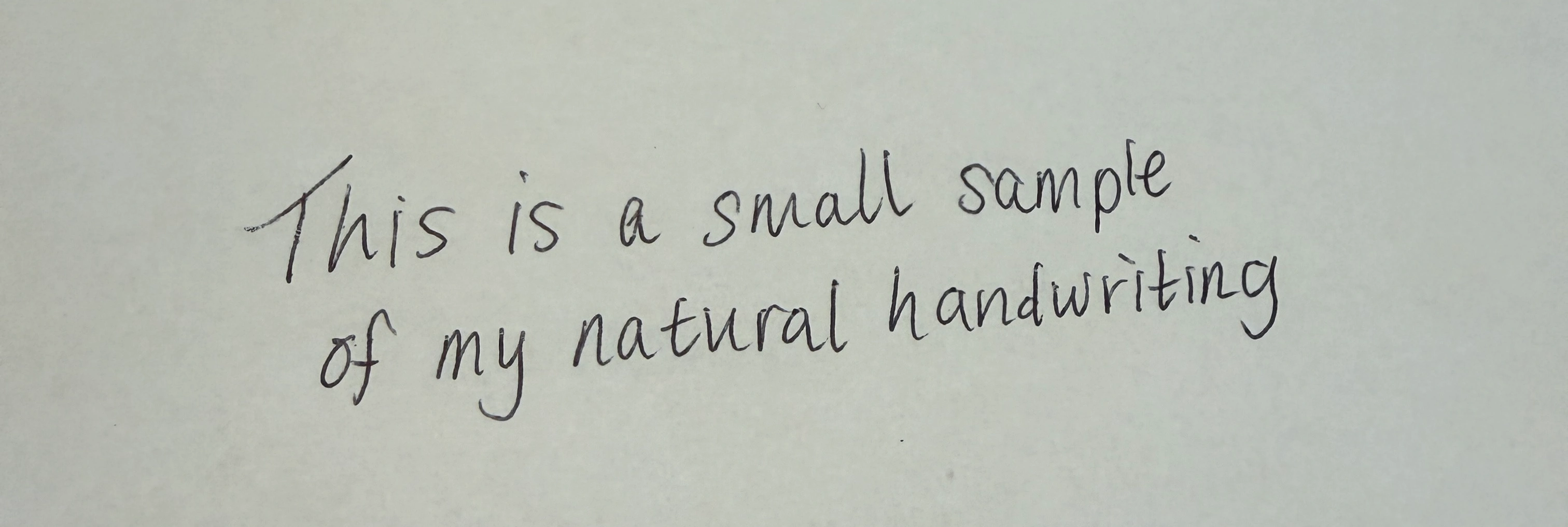
Use the font generation model when you need a custom type direction quickly. Generate from a prompt when you can describe the style. Generate from an image when you have a visual reference you want the model to follow.

The model returns a TTF file, so you can test generated fonts in product mockups, prototypes, design tools, and build pipelines.

<table
  className="font-use-cases-table font-prompt-preview-table"
  style={{
width: "100%",
maxWidth: "100%",
tableLayout: "fixed",
borderCollapse: "collapse",
borderBottom: "0",
}}
>
  <colgroup>
    <col style={{ width: "30%" }} />

    <col style={{ width: "70%" }} />
  </colgroup>

  <thead>
    <tr style={{ borderBottom: "0" }}>
      <th
        style={{
      border: "0",
      color: "#111111",
      fontWeight: 700,
      paddingRight: "0.75rem",
      textAlign: "left",
      verticalAlign: "top",
    }}
      >
        <span className="font-table-heading">Input</span>
      </th>

      <th
        style={{
      border: "0",
      color: "#111111",
      fontWeight: 700,
      paddingLeft: "0.75rem",
      textAlign: "left",
      verticalAlign: "top",
    }}
      >
        <span className="font-table-heading">Generated font preview</span>
      </th>
    </tr>
  </thead>

  <tbody>
    <tr style={{ borderBottom: "0" }}>
      <td style={{ border: "0", paddingRight: "0.75rem", verticalAlign: "top" }}>
        <div className="font-prompt-input">
          generate a font for a soccer team logo. Make the letterforms soccer
          themed, bold, and unique.

        </div>
      </td>

      <td style={{ border: "0", paddingLeft: "0.75rem", verticalAlign: "top" }}>
        <FontPreview fontFamily="Cipher Striker Ultra">
          STRIKERS SOCCER TEAM
        </FontPreview>

        <a href="https://static.mixfont.com/assets/20260603-224831-font-001-cipherstrikerultra-regular-1uj742pz.ttf" download="Cipher-Striker-Ultra.ttf" className="font-download-button" style={{ verticalAlign: "top" }}>
          <Icon icon="download" size={16} color="#111111" />

          Cipher-Striker-Ultra.ttf
        </a>
      </td>
    </tr>

    <tr style={{ borderBottom: "0" }}>
      <td style={{ border: "0", paddingRight: "0.75rem", verticalAlign: "top" }}>
        <img
          src="https://static.mixfont.com/assets/20260603-230108-image-e3prnt68.webp"
          alt="Wuthering Heights input example"
          style={{
        display: "block",
        marginTop: "0",
        width: "100%",
        maxWidth: "100%",
        borderRadius: "4px",
      }}
        />
      </td>

      <td style={{ border: "0", paddingLeft: "0.75rem", verticalAlign: "top" }}>
        <FontPreview fontFamily="Wuthering Heights Display">
          Wuthering Heights - Margot Robbie and Jacob Elordi
        </FontPreview>

        <a href="https://static.mixfont.com/assets/20260603-230122-font-001-generatedfont-regular-1-yrpido7g.ttf" download="Wuthering-Heights-Display.ttf" className="font-download-button" style={{ verticalAlign: "top" }}>
          <Icon icon="download" size={16} color="#111111" />

          Wuthering-Heights-Display.ttf
        </a>
      </td>
    </tr>

    <tr style={{ borderBottom: "0" }}>
      <td style={{ border: "0", paddingRight: "0.75rem", verticalAlign: "top" }}>
        <img
          src="https://static.mixfont.com/assets/20260603-225224-image-9sw57q4v.webp"
          alt="HANDY DAN'S Property Maintanence input example"
          style={{
        display: "block",
        marginTop: "0",
        width: "100%",
        maxWidth: "100%",
        borderRadius: "4px",
      }}
        />
      </td>

      <td style={{ border: "0", paddingLeft: "0.75rem", verticalAlign: "top" }}>
        <FontPreview fontFamily="Dystopian Brush Stroke Display">
          {"HANDY DAN'S PROPERTY MAINTANENCE"}
        </FontPreview>

        <a href="https://static.mixfont.com/assets/20260603-225219-font-001-dystopianbrushstrokedisplay-regular-chnivcf8.ttf" download="Dystopian-Brush-Stroke-Display.ttf" className="font-download-button" style={{ verticalAlign: "top" }}>
          <Icon icon="download" size={16} color="#111111" />

          Dystopian-Brush-Stroke-Display.ttf
        </a>
      </td>
    </tr>

    <tr style={{ borderBottom: "0" }}>
      <td style={{ border: "0", paddingRight: "0.75rem", verticalAlign: "top" }}>
        <img
          src="https://static.mixfont.com/assets/20260603-230210-image-5lg2741x.webp"
          alt="NASA logo input example"
          style={{
        display: "block",
        marginTop: "0",
        width: "100%",
        maxWidth: "100%",
        borderRadius: "4px",
      }}
        />
      </td>

      <td style={{ border: "0", paddingLeft: "0.75rem", verticalAlign: "top" }}>
        <FontPreview fontFamily="Dissonant Wave Sans">
          NASA - this preview text was generated from the NASA logo
        </FontPreview>

        <a href="https://static.mixfont.com/assets/20260603-230230-font-001-dissonantwavesans-regular-z9d7o2ui.ttf" download="Dissonant-Wave-Sans.ttf" className="font-download-button" style={{ verticalAlign: "top" }}>
          <Icon icon="download" size={16} color="#111111" />

          Dissonant-Wave-Sans.ttf
        </a>
      </td>
    </tr>

    <tr style={{ borderBottom: "0" }}>
      <td style={{ border: "0", paddingRight: "0.75rem", verticalAlign: "top" }}>
        <img
          src="https://static.mixfont.com/assets/20260603-230651-image-cgq0gjku.webp"
          alt="Natural handwriting input example"
          style={{
        display: "block",
        marginTop: "0",
        width: "100%",
        maxWidth: "100%",
        borderRadius: "4px",
      }}
        />
      </td>

      <td style={{ border: "0", paddingLeft: "0.75rem", verticalAlign: "top" }}>
        <FontPreview fontFamily="Zephyr Ink Script">
          This is a small sample of my natural handwriting as a font
        </FontPreview>

        <a href="https://static.mixfont.com/assets/20260603-230724-font-001-zephyrinkscript-regular-81hj01mq.ttf" download="Zephyr-Ink-Script.ttf" className="font-download-button" style={{ verticalAlign: "top" }}>
          <Icon icon="download" size={16} color="#111111" />

          Zephyr-Ink-Script.ttf
        </a>
      </td>
    </tr>
  </tbody>
</table>

## Match the input to the job

| Use case                                  | Recommended input        | Why                                                             |
| ----------------------------------------- | ------------------------ | --------------------------------------------------------------- |
| Explore a new brand direction             | Text prompt              | You can describe the category, mood, and visual constraints.    |
| Turn a sketch or sign into a font         | Image URL                | The model can use the reference image as the style source.      |
| Build many options for a design tool      | Text prompt              | Prompts are easy to template, vary, and store.                  |
| Recreate a visual direction from a mockup | Image URL                | The reference keeps the generation close to an existing design. |
| Generate production candidates            | Text prompt or image URL | Choose the input that best captures the desired style.          |

For text generation, describe the type category, use case, and distinctive details. For image generation, use a clear public image with readable letterforms.

## Prompt examples

| Use case           | Example prompt                                                                 |
| ------------------ | ------------------------------------------------------------------------------ |
| Wellness brand     | `A soft geometric sans with rounded terminals for a wellness app identity`     |
| SaaS dashboard     | `A neutral humanist sans serif with open counters for dense dashboard labels`  |
| Music poster       | `A bold compressed grotesk with industrial spacing for concert posters`        |
| Fashion editorial  | `A high-contrast editorial serif with sharp wedge serifs for luxury headlines` |
| Children's product | `A friendly rounded serif with playful curves for picture book packaging`      |
| Game UI            | `A sturdy angular display font with sharp cuts for a fantasy inventory screen` |

## Choose the right glyph set

Use `standard` when English support is enough for fast exploration, headings, logos, mockups, and first drafts. It generates 72 glyphs for English with basic letters, numbers, and punctuation.

Use `extended` when you need production candidates that support Latin-language text beyond English. It generates 319 glyphs for all Latin languages, including special characters, costs more credits, and may take 2-3 minutes to complete.

| Glyph set  | Best for                                               | Glyphs | Credits |
| ---------- | ------------------------------------------------------ | ------ | ------- |
| `standard` | English concepting, prototypes, and visual exploration | 72     | 20      |
| `extended` | Production candidates for all Latin languages          | 319    | 50      |

<CardGroup cols={3}>
  <Card title="Best Practices" icon="list-check" href="/docs/best-practices">
    Learn prompt, glyph set, polling, storage, and API key handling practices.
  </Card>

  <Card title="Generate from prompt" icon="keyboard" href="/docs/api-reference/font-generations/create-from-text">
    Review the text generation endpoint.
  </Card>

  <Card title="Generate from image" icon="image" href="/docs/api-reference/font-generations/create-from-image">
    Review the image generation endpoint.
  </Card>
</CardGroup>